Complete Guide to Identifying and Reporting Phishing Email
Don’t get scammed again! Easily Identify Phishing Email.

Don’t get scammed again! Easily Identify Phishing Email.
I have always despised Outlook as a POP3 or IMAP client. It’s heavy, slow, bloated software that is designed to integrate with Exchange server, an enterprise-level application. Corporations have teams of network engineers working to keep Exchange server and associated Outlook clients running. The average small to medium-sized business is not so lucky. We just want a trouble-free mail client that works every time we open it. Unfortunately, that is not Outlook.
Why not use Outlook? It’s heavy bloated software that struggles to perform simple email retrieval functions without having issues. Using it for POP3 or IMAP is a miserable experience. Since email is literally the cornerstone of business, this is unacceptable! In my year of using it, I experienced more downtime and frustration with Outlook than any other mail client I have ever used.
Some of the annoyances and issues I continuously encounter are:
The last time Outlook crashed, I finally had enough. It had to GO!
After some searching and reading reviews, I decided to take a chance on eM Client.
I opted for the Pro version which has a list of features that blows every other mail client away. The install was quick and easy and it loaded up all my IMAP messages quickly. After a few day of using eM Client, I was certain this was the mail client I had been looking for.
Things I love about eM Client:
Things that need improvement:
I have just scratched the surface of the capabilities of eM Client. I will report back here as I discover more pros and cons of eM Client. Check out eM Client for yourself!
Email: Strong Password Required
February 2020
In an effort to reduce email system abuse, we require the use of a strong password. In the case of VERY weak passwords, we have started restricted sending. If a sender recently started getting an error when trying to send and receive messages, we’d recommend that they update their email account password with a stronger password.
Email accounts that get restricted will still receive messages on our systems. Their messages will be available in their email client once the customer updates their password.
For customers using our email services, we have added a secure email port to our hosting server that is available to start using now. We added this for customers using iPhones which try to use this port by default. However, the port is available for everyone to use if you choose to do so.
Anyone who is *not* using SSL/TLS won’t be getting any warnings, and don’t need to change anything. So the rule is, anyone with SSL or TLS turned on (and it may be forced to “on” in some clients like iPhones) should use securemail.houstonshost.com for the incoming and outgoing server name.
Secure mail uses an encrypted SSL connection for both incoming POP and outgoing SMTP.
The new setting for secure mail are:
Incoming server: securemail.houstonshost.com
Port for POP3: 995
Outgoing server: securemail.houstonshost.com
If using SSL, then Port: 465
If using TLS, then Port: 587
Note that if you are using another email service like Office 365, Rackspace or Gmail, this does not apply to you.
When you think of someone hacking your Computer, Website, email account or worse yet, bank account, what do you think of? Some geeky computer prodigy working out of his mother’s basement, meticulously hacking his way into any computer system? The hackers you see in movies and on TV are a far cry from reality.
Hackers, better know now as “Script Kiddies” now rely on “scripts” or automated programs that perform hacking tasks automatically. These scanning scripts are readily available to download. They run against thousands of IP addresses 24/7 unattended. Once a vulnerability is found anywhere, it is flagged and then exploited.
One of the simplest ways for a hacker to compromise your account is called a Dictionary Attack.
A Dictionary Attack is when a script uses a dictionary file that includes every word in the dictionary to try and access your account. It runs and runs tirelessly trying to login using each word. This is the easiest form or attack because users still do not use strong passwords. Many people are in the habit of using easy, everyday words or names that are easily cracked.
The Next form of attack is called the the Hybrid Dictionary Attack. This stems from the fact the people use numbers or characters after simple words and names. So john1, john2, hello@, etc. are easily cracked using this method.
Finally, there is the brute Force Attack which is comprehensive attack on your password and can take weeks.
The point of all this is that you must use strong passwords to protect yourself from these advanced hacking programs.
A strong password should have alpha, numeric, upper & lower case characters. A good example of a strong password is “Bl%6i@20Az” . It may be hard to remember but it is worth the effort. This simple method can protect you from potential disaster.
Password bit and length correlation is beyond the scope of this post. Follow this link to learn more on Password Entropy and Length Correlations.
The United States Coast Guard Bahamas/U.S Embassy office has engaged Advanced Web Site Publishing (AWSP) to help them visually depict the amount and types of cases they have worked on in their region during the course of one year.
Commander Billburg of the U.S. Coast Guard states “The SAR and AMIO picture is essential to understanding our multi-mission response ops and what really goes on around in the Bahamas.”
The Flash movie format will illustrate all Search and Rescues (SAR’s), Alien Migrant Interdiction Operations (AMIO) and Maritime Drug Interdictions in cooperation with OPBAT.
OPBAT is a combined Coast Guard, U.S. Army, U.S. Drug Enforcement Administration (DEA) and Bahamian operation. The operation incorporates assets and personnel from each entity to combat drug smuggling to and from The Bahamas. OPBAT is a helicopter oriented effort that uses Coast Guard and Army HH60 aircraft, manned with DEA and Bahamian law enforcement agents, to interdict drug smugglers using the Bahamas as a transit zone. OPBAT forces are commonly used against drug air drops (or mothership hand offs) to waiting go-fast style boats. Aircraft and crews are stationed at locations throughout the Bahamas and are tasked by a central OPBAT command center in Nassau.
The Flash based movie will calculate a running tally of the lives saved and assisted plus it will give totals of:
The amount of drugs seized
The types of drugs seized
Arrests Made
Keith Hickman, President of Advanced Web Site Publishing stated, “We are very proud to be of assistance to the men and women who risk their lives to guard our countries borders. We will continue to work with the USCG and other government agencies that can use our expertise.”
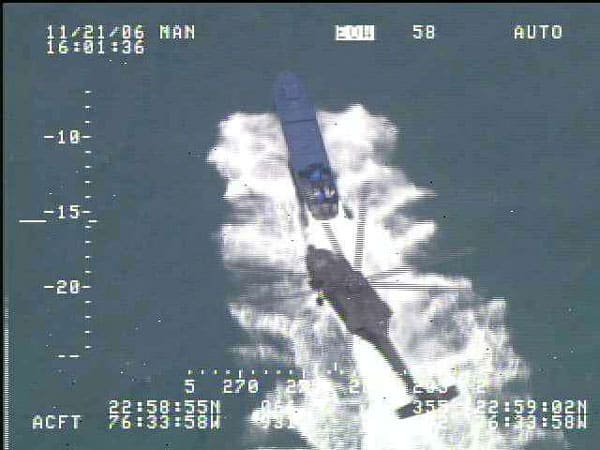
Chasing Drug Running “Go Boat”
Support is available 24 Hours a day: [email protected]
Tel: 713-724-7483


